Back to That One Blog
You Do Not Need to Spend Money Just to Use AI
Not all AI is created equal - and you definitely don't need to pay for all of it. There's a tier for every problem, from free tools you're probably already using to complex platforms that take months to configure. Here's how to match the right tool to the job, and where the missing middle fits in.
Published May 7, 2026 4 min read
After sitting through a lunch and learn with a room full of Texas realtors, one thing became crystal clear: the AI tools being demoed were impressive, but they left half the room feeling like AI was something that required a computer science degree and a tolerance for frustration. It does not. The problem was not the tools. It was the missing context around them.
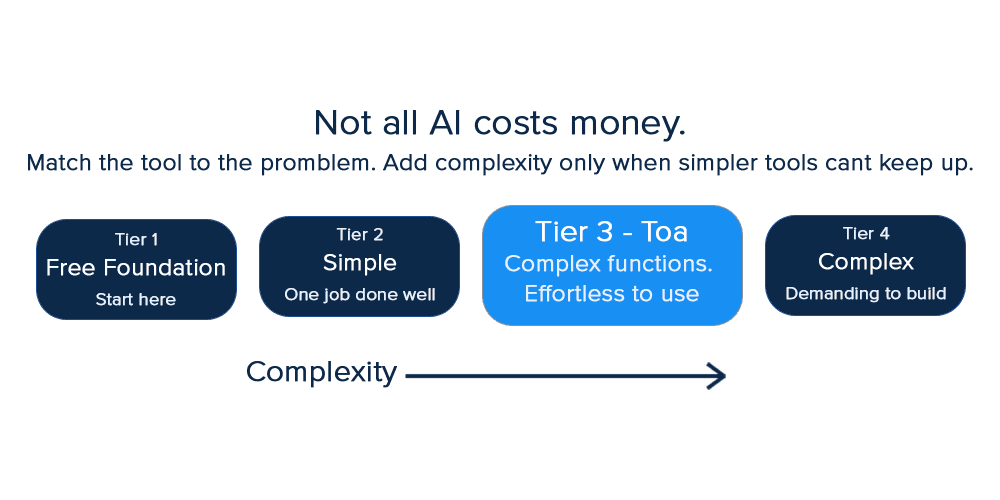
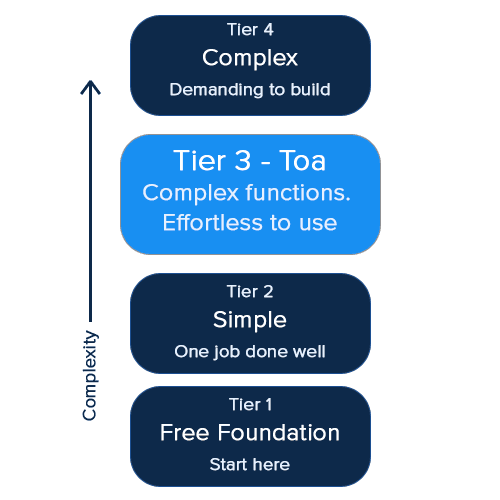
So here is what that presentation skipped: a map of the actual landscape. There are tiers to AI, ranging from zero setup to serious configuration, and they all have their place. Sometimes the complex tools are overkill. Sometimes the free ones are all you ever need. The trick is matching the tool to the problem, not the other way around.
Tier 1: Free tools. Start here, seriously
You do not need a credit card to get real value out of AI. The following tools all have free tiers that are genuinely useful, not just trial bait.
Google Gemini
Built into the search engine you already use. Zero setup. Ask it anything.
ChatGPT
Conversational, builds memory over time. Good for creative work, writing, and brainstorming.
Microsoft Copilot
Lives inside Outlook, Word, and Excel. If your work is already in Microsoft, it is already here.
Claude
Has a personal preferences setting that gives it context about you, your business, and your tone on every conversation.

One instruction worth adding to Claude's personal preferences immediately: "Do not immediately agree with me unless what I present is accurate." That single line turns it from a yes-machine into something that actually sharpens your thinking.
All five are what you would call foundational models. They each have paid tiers that unlock more - image generation, longer documents, deeper integrations - but the free versions are not crippled. They are useful right now, today, without spending anything.
Tier 2: Focused tools. One job, done extremely well.
This is where real automation starts showing up, but the learning curve stays low. These tools are built to solve one specific workflow problem. You plug them in, they do their thing, and the value shows up fast.
For building a website or app
Base44 is an AI-powered site and app builder. You describe what you want in plain language, and it gets you 80% of the way there without touching a line of code. It was acquired by Wix in 2025, so it now connects into Wix's broader hosting ecosystem for those who want to take it further.
For email, two very different answers
Jace.ai is focused on reducing how much you interact with your inbox. It connects to Gmail or Outlook and handles organizing, drafting, and automating your email workflow - including AI-generated folders and labels that sort incoming messages automatically. Fair warning: it can feel a little aggressive when it first starts reorganizing your inbox. The folders and labels are easy enough to remove, but it is worth knowing before you connect it.
Superhuman takes the opposite philosophy. Where Jace is built to minimize inbox interaction, Superhuman is built to make those interactions as fast as humanly possible. It auto-drafts replies before you even open the email, surfaces only what needs your attention, and uses keyboard shortcuts to strip out every unnecessary second. The speed is the entire product.
For your calendar
Reclaim and Morgen are both built for one thing: time optimization. Conflicts, scheduling goals, planning your month, that is their lane, and they stay in it. If it is on your calendar, they will make sure it happens.
Tier 3: Complex platforms. Powerful, but not plug- and- play
These tools require time and dedication to implement effectively, but the ceiling on what they can do is significantly higher than anything else on this list. Done well, they can reshape how an entire team or business operates. Done halfway, they become expensive tools that nobody fully uses.
Monday.com is a full work management platform with AI built into boards, automations, workflows, and CRM. It handles project tracking, collaboration, and large-scale automation. The catch: real value comes from well-structured workflows, without a clear setup, it can become more work than it saves. Its AI (workflow generation, task categorization, agent builder) is powerful but rewards thoughtful implementation.
ChatGPT Operator and Workspace lets you connect AI directly to your tools and data, build custom GPTs, and automate multi-step workflows. With the right context, it acts more like a background system than a chatbot. The tradeoff: you need a clear mental model of your processes to configure it effectively.
Claude Cowork is a desktop tool focused on automating local files and everyday tasks without coding. It excels in file-based workflows and can integrate with other AI tools for deeper automation. Setup takes effort, but once configured, it offers strong contextual awareness for your personal environment.
All three of these tools sit in a category of their own. They are not necessarily the most expensive, but they are the most demanding to implement. The payoff is real when you commit to it.
Toa: Where Toa fits and why we built it where we did
Full transparency: Toa is our product. So, take the following with appropriate skepticism and then consider whether it holds up.
The gap we kept seeing was this: simple tools do one thing. Complex platforms do everything but cost you weeks to set up. Most realtors and salespeople do not need to overhaul everything. They need their existing workflow - email, calendar, tasks - to stop breaking down. Missed follow-ups. Forgotten replies. Action items that disappear into an email thread from two weeks ago.
Toa handles email drafting, meeting scheduling, task extraction, and task tracking, all in one place. No app switching. No missed follow-ups. No wondering what you were supposed to do after a client call. For individual agents, that means staying on top of the day without learning a new system. For growing teams, it means follow-through stops depending on individual habits and starts happening consistently.
The goal is not to replace your CRM or overhaul your workflow. It is to make sure nothing slips.
The actual takeaway
Match the tool to the problem. Start free. Add complexity only when the simpler tools genuinely cannot keep up. And if your current problem is follow-through - email, scheduling, and tasks falling through the cracks - that is exactly what Toa was built for.
Frequently asked questions
Do any free AI tools work for real estate professionals specifically?
Yes. ChatGPT and Claude are both useful for drafting listing descriptions, client emails, and follow-up messages at no cost. Google Gemini can surface market information quickly. None of them require any real estate-specific setup to get started.
What is the difference between Superhuman and Jace.ai?
Jace is built to minimize how much time you spend in your inbox by automating organization and drafts. Superhuman is built to make every inbox interaction faster. Different philosophies, both focused on email - the right one depends on whether you want less email or faster email.
Is Claude Cowork good for realtors?
It can be, but it requires setup time before it delivers value. If you have someone to configure it for your workflow, it is worth exploring. If you need something you can use today without configuration, it is not the right starting point.
What AI tools do Texas realtors actually use day to day?
Most are using foundational models like ChatGPT or Gemini for content and communication drafting. Email and calendar tools like the ones above are growing in adoption. Toa was built specifically for the follow-through problems realtors face most - missed follow-ups and scattered tasks.
Do I need to pay for AI to get real value from it?
No. The free tiers of ChatGPT, Claude, Gemini, Copilot, and Grok are all genuinely useful. Paid tiers unlock more features, but they are not required to start getting value today.